
Blender 4.0 Essential Training
Master Blender workflows to model, animate, and render scenes
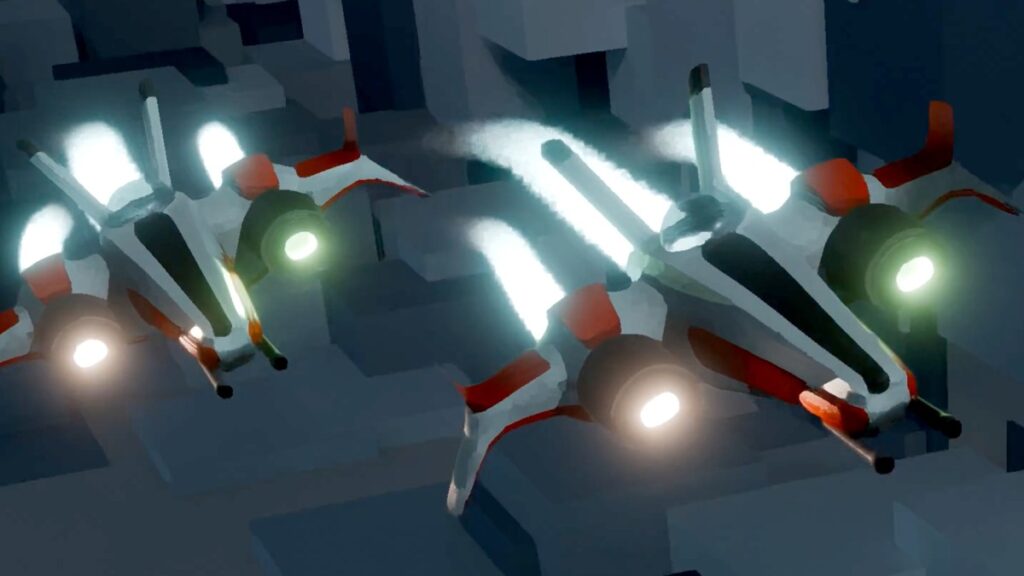
Blender 4.0 Essential Training, taught by David Andrade, presents a practical, project-driven introduction to Blender 4.0 that covers core areas like modeling, sculpting, shading and texturing, rigging and animation, geometry nodes, visual effects, and rendering. The curriculum emphasizes hands-on demonstrations and challenge exercises so learners can apply Blender workflows directly to games, animation, and VFX tasks.
The course pairs step-by-step how-to lessons with downloadable exercise files and focused challenges to reinforce transferable skills and production thinking. It is aimed at beginners through early-intermediate users who want a concise, applied foundation in Blender’s key toolsets and rendering pipelines.
At a Glance
Blender 4.0 Essential Training is an introductory-to-intermediate course that teaches practical Blender workflows and production techniques, led by instructor David Andrade.
The course covers core areas such as modeling, sculpting, shading and texturing, animation and rigging, geometry nodes, visual effects, and rendering, with an emphasis on practical how-to demonstrations and performance tips.
| Level | Beginner to Intermediate |
| Rating | 4.8 out of 5 |
| Duration | 4+ hours |
| Languages | English |
| Certificate | Certificate of completion (shareable) |
| Access | Included with LinkedIn Learning subscription — access while your subscription is active |
| Course includes |
|
| Price | Subscription-based; included with LinkedIn Learning (one-month free trial available) |
What This Course Teaches
The course frames outcomes as measurable competencies you can demonstrate in real projects, focusing on practical, production-ready Blender workflows.
By the end of the course you will be able to build models and assets, implement materials and lighting, rig and animate characters, and use geometry nodes and simulations to produce render-ready scenes.
How the Course Is Structured
The course is organized into eight top-level sections (including Introduction and Conclusion), each containing multiple lessons and practical exercises, and runs about 4+ hours in total. The syllabus is arranged as a linear progression from orientation through project-based modules and finishes with a wrap-up, with challenge exercises embedded in several sections.
Curriculum overview
01Introduction▾
Orientation and setup: introducing Blender 4.0, installation tips, and how to use the course exercise files.
021. Your First Hour with Blender▾
Foundational interface and workflow lessons covering Blender basics, menus, modeling primitives, modifiers, materials, and lighting.
- Challenge: Make your first scene in Blender
- Solution: Render your first scene in Blender
032. Create a Starfighter▾
Project-focused module that uses Grease Pencil for concepting and walks through 3D modeling techniques and boolean operations.
- Challenge: Fix a 3‑D model
- Solution: N‑Gons in Blender
043. Shade and Texture▾
Shading and texturing lessons covering node-based materials, texture painting workflows, and the Node Wrangler add-on.
- Challenge: Detail your starfighter
- Solution: Detail your starfighter
054. Learn to Rig and Animate▾
Covers rigging concepts, refining armatures, keyframing, Pose Mode, and the Graph Editor for animation workflows.
- Challenge: Animate your first scene
- Solution: Animate your first scene
065. Why Geometry Nodes Are Amazing▾
Introduces geometry nodes with sample setups for procedural modeling, VFX, and converting node graphs into reusable tools.
- Challenge: Implement Geometry Nodes
- Solution: Implementing Geometry Nodes
076. Put It All Together▾
Integration and finishing techniques including scene organization, asset libraries, lighting strategies, rendering with Cycles and EEVEE, and compositing.
- Challenge: Render your first animation
- Solution: Render your first animation
08Conclusion▾
Course wrap-up with recommended next steps and pointers to further learning resources.
Audience & Requirements
The course is aimed at beginners through early intermediate users who want practical, production-oriented Blender skills for creative projects and entry-level pipeline work. It suits hobbyists, aspiring game or VFX artists, and professionals seeking to add Blender-based modeling, shading, animation, and rendering to their toolkit.
- Beginners wanting a practical introduction to Blender workflows and tools.
- Hobbyist and freelance artists building 3D models and animations for personal or indie projects.
- Game artists and motion designers seeking transferable production techniques.
- Students or professionals looking to add Blender skills to a creative portfolio.
- Blender 4.0 (or a recent 4.x build) installed to follow along with exercises.
- Access to the course exercise file for hands-on practice (provided with the course).
- No special prerequisites — the course accepts learners with no prior Blender experience.
Note: While there are no formal prerequisites, several modules cover intermediate topics (geometry nodes, simulations, and advanced rendering) that may be challenging without additional practice or prior 3D exposure.
Final Verdict
Overall, Blender 4.0 Essential Training is a practical, production-focused introduction that balances broad coverage with hands-on exercises and real course assets.
Given its strong rating and wide learner uptake, together with a shareable completion certificate and subscription-based access, it represents good value for learners who can use the platform—especially those seeking a concise, project-driven path into Blender.
Recommended for beginners and early-intermediate creators who want transferable skills for games, VFX, or general 3D workflows; consider using the platform’s trial to confirm the pacing fits your experience level.


 Pluralsight
 Skillshare