
Blender Fundamentals
Build and render a drone spaceship using Blender end-to-end
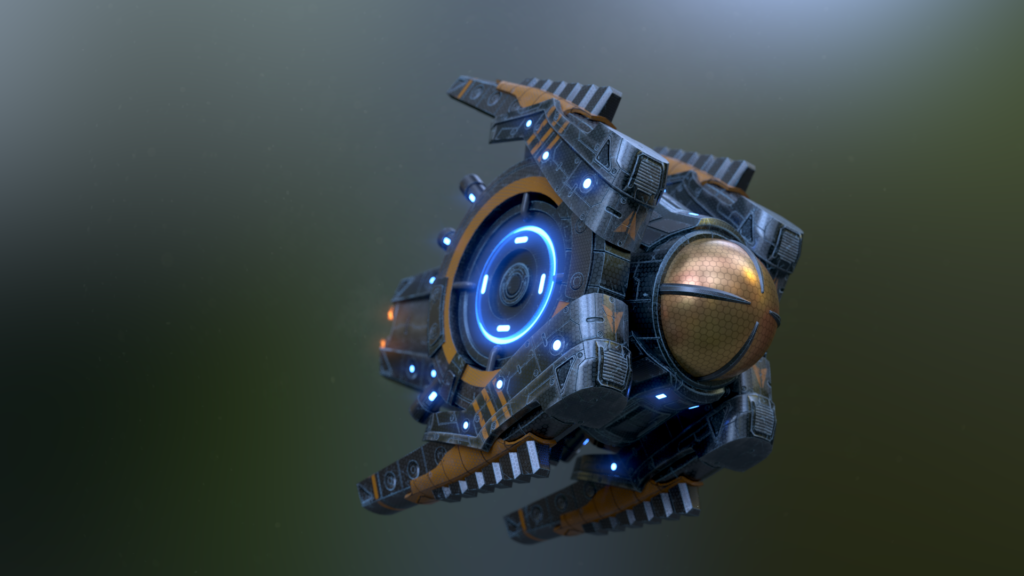
Blender Fundamentals is a project-driven introductory course that introduces core Blender workflows for 3D modeling, texturing, rigging, animation, lighting, and rendering in a single, end-to-end project context.
The course walks learners through building a drone spaceship from concept to final render, emphasizing practical techniques for producing portfolio-ready 3D assets and mastering Blender’s interface and toolset.
At a Glance
Blender Fundamentals is an introductory Pluralsight course that walks learners through creating a drone spaceship from the ground up using Blender.
Mark Masters teaches core Blender workflows including navigation, modeling, texturing, rigging, animation, lighting, and rendering.
| Level | Beginner |
| Rating | 4.6 out of 5 |
| Duration | 9+ hours |
| Languages | English |
| Certificate | Certificate of completion |
| Access | Access for as long as your subscription is active |
| Course includes |
|
| Price | Included with subscription (individual and business plans) |
What This Course Teaches
This course frames outcomes as concrete, demonstrable Blender skills you can apply to produce a finished 3D asset and its rendered animation.
By the end of the course learners can build a drone model, apply textures and materials, rig and animate parts, implement dynamics effects, and light and composite a final rendered scene.
How the Course Is Structured
Blender Fundamentals is organized as a sequence of short, focused sections that together form a complete workflow for building and rendering a drone spaceship.
The published syllabus lists 10 named sections and the full course runs for about 9 hours total, intended for self-paced study.
Curriculum overview
01Course Overview▾
Introduces the course goals, the final project (a drone spaceship), and how the learning path is structured.
02Module Overview▾
Outlines the module-by-module plan and what students should complete to finish the project.
03Viewport Navigation▾
Covers navigating the 3D viewport, camera controls, and common viewport shortcuts.
04Basics of the UI▾
Introduces Blender’s interface elements, panels, and the layout used throughout the course.
05UI Customization▾
Shows how to customize workspaces, toolbars, and preferences to streamline a personal workflow.
06Examining the Toolbar▾
Reviews common modeling and editing tools found in Blender’s toolbar and when to use them.
07Diving into the Properties Panel▾
Explains key property tabs and settings that control object data, materials, and render options.
08Understanding Selection in Blender▾
Demonstrates selection techniques across object and edit modes to prepare geometry for editing.
09Transform and Manipulation Tools▾
Covers translate/rotate/scale operations, pivot controls, snapping, and precision transforms.
10Learning About Modes▾
Explains Blender’s mode system (Object, Edit, Sculpt, etc.) and when to work in each mode.
Audience & Requirements
This course is aimed at learners who want a practical, project-based entry into Blender rather than purely theoretical instruction.
It is well suited for complete beginners, hobbyists, and early-career creatives who want to learn the end-to-end process for producing a finished 3D asset.
- Complete beginners seeking a hands-on Blender introduction.
- Hobbyist 3D artists who want a project-based portfolio piece.
- Aspiring animators or riggers learning practical pipeline steps.
- Students or instructors needing a compact course to teach core Blender workflows.
- Blender (installed; the course uses the official Blender application).
- No prior 3D or Blender experience required.
- A mouse with middle-click is recommended for efficient viewport navigation.
- A computer that meets Blender’s system requirements (sufficient CPU/GPU and RAM for 3D work).
Final Verdict
Blender Fundamentals is a practical, project-driven introduction that I recommend for beginners and hobbyists who want a compact, end-to-end workflow for creating and rendering a 3D asset.
Given its strong user rating and an experienced instructor, the course offers good instructional value, especially for learners who already use the platform’s subscription; the availability of a certificate of completion and downloadable course files strengthens its usefulness for portfolio and skill-development work.
If you do not plan to maintain a subscription, weigh the platform access model against how intensively you will practice, but for active learners and those seeking a structured, hands-on Blender primer this course is a confident, practical choice.

 Skillshare

 LinkedIn Learning